Parameters Tuning
This page contains parameters tuning guides for different scenarios.
List of other helpful links
Tune Parameters for the Leaf-wise (Best-first) Tree
LightGBM uses the leaf-wise tree growth algorithm, while many other popular tools use depth-wise tree growth. Compared with depth-wise growth, the leaf-wise algorithm can converge much faster. However, the leaf-wise growth may be over-fitting if not used with the appropriate parameters.
To get good results using a leaf-wise tree, these are some important parameters:
num_leaves. This is the main parameter to control the complexity of the tree model. Theoretically, we can setnum_leaves = 2^(max_depth)to obtain the same number of leaves as depth-wise tree. However, this simple conversion is not good in practice. The reason is that a leaf-wise tree is typically much deeper than a depth-wise tree for a fixed number of leaves. Unconstrained depth can induce over-fitting. Thus, when trying to tune thenum_leaves, we should let it be smaller than2^(max_depth). For example, when themax_depth=7the depth-wise tree can get good accuracy, but settingnum_leavesto127may cause over-fitting, and setting it to70or80may get better accuracy than depth-wise.min_data_in_leaf. This is a very important parameter to prevent over-fitting in a leaf-wise tree. Its optimal value depends on the number of training samples andnum_leaves. Setting it to a large value can avoid growing too deep a tree, but may cause under-fitting. In practice, setting it to hundreds or thousands is enough for a large dataset.max_depth. You also can usemax_depthto limit the tree depth explicitly.
For Faster Speed
Add More Computational Resources
On systems where it is available, LightGBM uses OpenMP to parallelize many operations. The maximum number of threads used by LightGBM is controlled by the parameter num_threads. By default, this will defer to the default behavior of OpenMP (one thread per real CPU core or the value in environment variable OMP_NUM_THREADS, if it is set). For best performance, set this to the number of real CPU cores available.
You might be able to achieve faster training by moving to a machine with more available CPU cores.
Using distributed (multi-machine) training might also reduce training time. See the Distributed Learning Guide for details.
Use a GPU-enabled version of LightGBM
You might find that training is faster using a GPU-enabled build of LightGBM. See the GPU Tutorial for details.
Grow Shallower Trees
The total training time for LightGBM increases with the total number of tree nodes added. LightGBM comes with several parameters that can be used to control the number of nodes per tree.
The suggestions below will speed up training, but might hurt training accuracy.
Decrease max_depth
This parameter is an integer that controls the maximum distance between the root node of each tree and a leaf node. Decrease max_depth to reduce training time.
Decrease num_leaves
LightGBM adds nodes to trees based on the gain from adding that node, regardless of depth. This figure from the feature documentation illustrates the process.
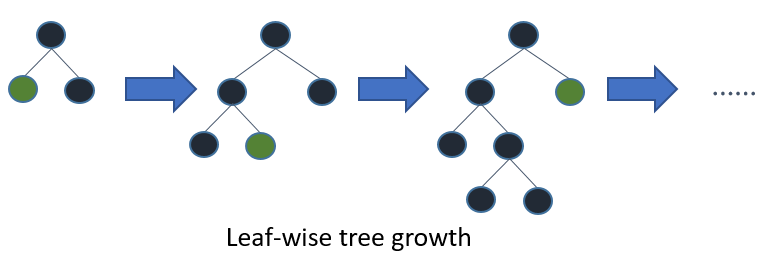
Because of this growth strategy, it isn’t straightforward to use max_depth alone to limit the complexity of trees. The num_leaves parameter sets the maximum number of nodes per tree. Decrease num_leaves to reduce training time.
Increase min_gain_to_split
When adding a new tree node, LightGBM chooses the split point that has the largest gain. Gain is basically the reduction in training loss that results from adding a split point. By default, LightGBM sets min_gain_to_split to 0.0, which means “there is no improvement that is too small”. However, in practice you might find that very small improvements in the training loss don’t have a meaningful impact on the generalization error of the model. Increase min_gain_to_split to reduce training time.
Increase min_data_in_leaf and min_sum_hessian_in_leaf
Depending on the size of the training data and the distribution of features, it’s possible for LightGBM to add tree nodes that only describe a small number of observations. In the most extreme case, consider the addition of a tree node that only a single observation from the training data falls into. This is very unlikely to generalize well, and probably is a sign of overfitting.
This can be prevented indirectly with parameters like max_depth and num_leaves, but LightGBM also offers parameters to help you directly avoid adding these overly-specific tree nodes.
min_data_in_leaf: Minimum number of observations that must fall into a tree node for it to be added.min_sum_hessian_in_leaf: Minimum sum of the Hessian (second derivative of the objective function evaluated for each observation) for observations in a leaf. For some regression objectives, this is just the minimum number of records that have to fall into each node. For classification objectives, it represents a sum over a distribution of probabilities. See this Stack Overflow answer for a good description of how to reason about values of this parameter.
Grow Less Trees
Decrease num_iterations
The num_iterations parameter controls the number of boosting rounds that will be performed. Since LightGBM uses decision trees as the learners, this can also be thought of as “number of trees”.
If you try changing num_iterations, change the learning_rate as well. learning_rate will not have any impact on training time, but it will impact the training accuracy. As a general rule, if you reduce num_iterations, you should increase learning_rate.
Choosing the right value of num_iterations and learning_rate is highly dependent on the data and objective, so these parameters are often chosen from a set of possible values through hyperparameter tuning.
Decrease num_iterations to reduce training time.
Use Early Stopping
If early stopping is enabled, after each boosting round the model’s training accuracy is evaluated against a validation set that contains data not available to the training process. That accuracy is then compared to the accuracy as of the previous boosting round. If the model’s accuracy fails to improve for some number of consecutive rounds, LightGBM stops the training process.
That “number of consecutive rounds” is controlled by the parameter early_stopping_rounds. For example, early_stopping_rounds=1 says “the first time accuracy on the validation set does not improve, stop training”.
Set early_stopping_rounds and provide a validation set to possibly reduce training time.
Consider Fewer Splits
The parameters described in previous sections control how many trees are constructed and how many nodes are constructed per tree. Training time can be further reduced by reducing the amount of time needed to add a tree node to the model.
The suggestions below will speed up training, but might hurt training accuracy.
Enable Feature Pre-Filtering When Creating Dataset
By default, when a LightGBM Dataset object is constructed, some features will be filtered out based on the value of min_data_in_leaf.
For a simple example, consider a 1000-observation dataset with a feature called feature_1. feature_1 takes on only two values: 25.0 (995 observations) and 50.0 (5 observations). If min_data_in_leaf = 10, there is no split for this feature which will result in a valid split at least one of the leaf nodes will only have 5 observations.
Instead of reconsidering this feature and then ignoring it every iteration, LightGBM filters this feature out at before training, when the Dataset is constructed.
If this default behavior has been overridden by setting feature_pre_filter=False, set feature_pre_filter=True to reduce training time.
Decrease max_bin or max_bin_by_feature When Creating Dataset
LightGBM training buckets continuous features into discrete bins to improve training speed and reduce memory requirements for training. This binning is done one time during Dataset construction. The number of splits considered when adding a node is O(#feature * #bin), so reducing the number of bins per feature can reduce the number of splits that need to be evaluated.
max_bin is controls the maximum number of bins that features will bucketed into. It is also possible to set this maximum feature-by-feature, by passing max_bin_by_feature.
Reduce max_bin or max_bin_by_feature to reduce training time.
Increase min_data_in_bin When Creating Dataset
Some bins might contain a small number of observations, which might mean that the effort of evaluating that bin’s boundaries as possible split points isn’t likely to change the final model very much. You can control the granularity of the bins by setting min_data_in_bin.
Increase min_data_in_bin to reduce training time.
Decrease feature_fraction
By default, LightGBM considers all features in a Dataset during the training process. This behavior can be changed by setting feature_fraction to a value > 0 and <= 1.0. Setting feature_fraction to 0.5, for example, tells LightGBM to randomly select 50% of features at the beginning of constructing each tree. This reduces the total number of splits that have to be evaluated to add each tree node.
Decrease feature_fraction to reduce training time.
Decrease max_cat_threshold
LightGBM uses a custom approach for finding optimal splits for categorical features. In this process, LightGBM explores splits that break a categorical feature into two groups. These are sometimes called “k-vs.-rest” splits. Higher max_cat_threshold values correspond to more split points and larger possible group sizes to search.
Decrease max_cat_threshold to reduce training time.
Use Less Data
Use Bagging
By default, LightGBM uses all observations in the training data for each iteration. It is possible to instead tell LightGBM to randomly sample the training data. This process of training over multiple random samples without replacement is called “bagging”.
Set bagging_freq to an integer greater than 0 to control how often a new sample is drawn. Set bagging_fraction to a value > 0.0 and < 1.0 to control the size of the sample. For example, {"bagging_freq": 5, "bagging_fraction": 0.75} tells LightGBM “re-sample without replacement every 5 iterations, and draw samples of 75% of the training data”.
Decrease bagging_fraction to reduce training time.
Save Constructed Datasets with save_binary
This only applies to the LightGBM CLI. If you pass parameter save_binary, the training dataset and all validations sets will be saved in a binary format understood by LightGBM. This can speed up training next time, because binning and other work done when constructing a Dataset does not have to be re-done.
For Better Accuracy
Use large
max_bin(may be slower)Use small
learning_ratewith largenum_iterationsUse large
num_leaves(may cause over-fitting)Use bigger training data
Try
dart
Deal with Over-fitting
Use small
max_binUse small
num_leavesUse
min_data_in_leafandmin_sum_hessian_in_leafUse bagging by set
bagging_fractionandbagging_freqUse feature sub-sampling by set
feature_fractionUse bigger training data
Try
lambda_l1,lambda_l2andmin_gain_to_splitfor regularizationTry
max_depthto avoid growing deep treeTry
extra_treesTry increasing
path_smooth